Adjust the numbers below to sketch out a mortgage payment plan in real time.
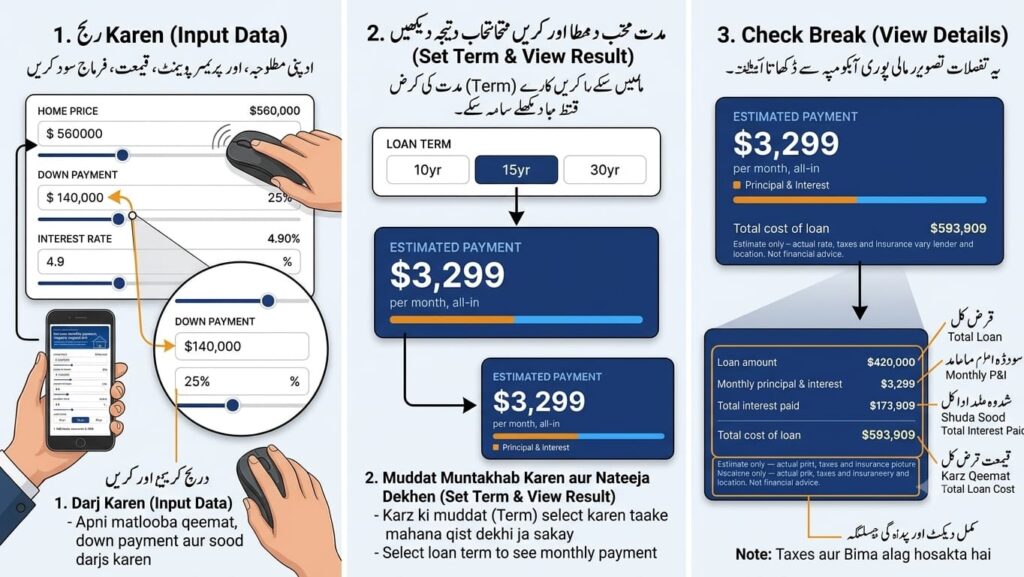
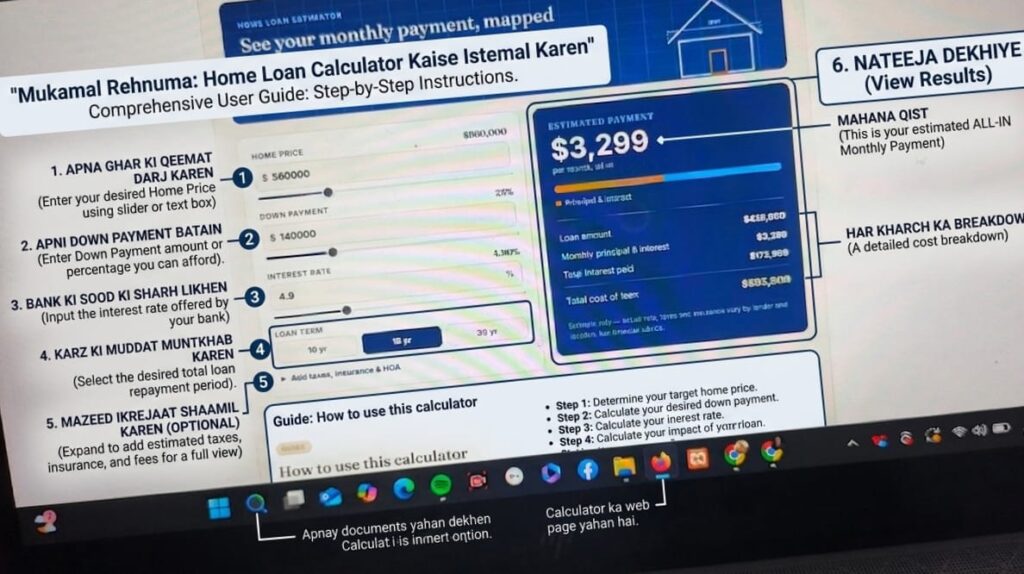
Four inputs are all it takes to get an accurate monthly payment estimate.
Type the purchase price directly, or drag the slider. This is the full price of the property before any down payment is subtracted.
Enter it as a dollar amount — the percentage updates automatically. A larger down payment lowers your loan amount and monthly payment.
Enter the interest rate your lender quoted, then choose a 10, 15, or 30 year term. Shorter terms mean higher payments but far less total interest.
Open "Add taxes, insurance & HOA" to fold property tax, homeowners insurance, and HOA dues into a true all-in monthly figure.
Common questions about how the numbers are calculated.
The calculator uses the standard amortization formula on your loan amount (home price minus down payment), interest rate, and loan term to work out a fixed monthly principal & interest payment. If you've added taxes, insurance, or HOA dues, those are divided into monthly amounts and added on top to show your full estimated payment.
Only if you enter them. Open "Add taxes, insurance & HOA" below the loan term and enter your annual property tax, annual insurance premium, and monthly HOA dues. These get added to your principal & interest to give a full "all-in" monthly figure, similar to a PITI payment.
A shorter term pays down the loan balance faster, so interest has less time to accumulate. Monthly payments are higher, but the total interest paid over the life of the loan is significantly lower — the "Total interest paid" figure updates automatically when you switch terms so you can compare directly.
No. This tool gives a close estimate based on the numbers you enter. Actual loan offers depend on your credit profile, the lender's rates and fees, local tax rates, insurance quotes, and loan program rules (conventional, FHA, VA, etc.). Always confirm final figures with a licensed mortgage lender.
20% is a common benchmark because it typically avoids private mortgage insurance (PMI) on conventional loans, but many buyers put down less. Try a few different amounts in the calculator to see how the monthly payment and total interest change as your down payment goes up or down.
Yes. Enter your current home value (or remaining balance) as the "Home price," set the down payment to $0 if you're refinancing the full balance, then enter your new rate and term to estimate the new monthly payment.
If you’ve ever typed “how much house can I afford” into Google at 1 a.m., you already know why mortgage calculators exist. Buying a home is probably the biggest financial decision most people will ever make, and yet a huge number of buyers walk into it with nothing more than a vague number in their head and a lot of hope. A mortgage calculator is the tool that turns that vague number into something real — a monthly payment you can actually plan your life around.
This guide is going to walk you through everything about mortgage calculators: what they are, how they work under the hood, what each input actually means, the different types you’ll come across, how to read the results properly, the mistakes almost everyone makes the first time, and how to use the numbers to make a genuinely smart decision instead of an emotional one. No fluff, no recycled definitions — just the kind of explanation you’d want from a friend who happens to know finance.
At its core, a mortgage calculator is a small piece of software — usually a web form — that takes a handful of numbers about a home loan and turns them into an estimated monthly payment. You type in things like the loan amount, the interest rate, and how many years you’ll be paying it off, and it spits out a number: this is roughly what you’ll owe every month.
That sounds simple, and in its most basic form, it is. But the reason mortgage calculators are so useful isn’t just the math — it’s what they let you do with that math. You can change one number, say the down payment, and instantly see how the monthly payment shifts. You can compare a 15-year loan against a 30-year loan side by side. You can see, in black and white, how much of your early payments go toward interest versus how much actually chips away at what you owe. It turns an abstract, intimidating process into something you can play with and understand.
Lenders use much more detailed versions of this same math when they underwrite a loan. Real estate agents use it to help clients figure out what price range makes sense. Financial advisors use it when planning a client’s long-term budget. And ordinary buyers use it, more than anything else, to answer one simple question: can I actually afford this?
Here’s the thing that a lot of first-time buyers don’t realize until it’s too late: the sticker price of a house is almost never the number that matters. What matters is the monthly payment, because that’s the number that has to fit into your actual life — your paycheck, your groceries, your car payment, your savings goals, all of it.
Two houses priced at $350,000 can have completely different monthly payments depending on the interest rate you lock in, how much you put down, and whether you’re financing for 15 years or 30. A mortgage calculator is the only quick way to see that difference before you’re sitting across a desk from a loan officer.
There’s also an emotional side to this that doesn’t get talked about enough. House hunting is stressful, and it’s easy to fall in love with a place that’s slightly out of your budget and then talk yourself into stretching. Having a calculator you trust, with realistic numbers plugged in, acts as a kind of reality check. It’s a lot easier to walk away from a house you can’t quite afford when you have actual numbers in front of you instead of just a feeling in your gut.
Let’s actually open the hood, because understanding this makes you a smarter borrower, not just a calculator user.
Most mortgage calculators are built around what’s called an amortization formula. Don’t let the word scare you — all it means is “how a loan gets paid down over time in equal installments.” The formula looks intimidating when you see it written out:
M = P [ r(1+r)^n ] / [ (1+r)^n – 1 ]
Where:
You will never need to do this by hand — that’s literally the whole point of the calculator existing. But knowing what’s happening behind the scenes helps you understand why certain things move the payment the way they do. For instance, because interest compounds, even a small change in your rate — say from 6.5% to 7% — can add tens of thousands of dollars over the life of a 30-year loan. That’s not a rounding error. That’s real money.
The calculator also usually layers on top of this base payment a few other recurring costs, which brings us to the next section.
This is where most guides get lazy and just list terms without explaining why they matter. Let’s actually go through each one properly.
This is the price you’re agreeing to pay for the property. Simple enough, but worth noting: this number by itself tells you almost nothing about affordability. A $500,000 home with 20% down and a great rate can be more affordable monthly than a $350,000 home with 3% down and a mediocre rate.
This is the chunk of the home price you’re paying upfront, out of pocket, rather than borrowing. It’s usually expressed as a percentage of the home price — 5%, 10%, 20%, and so on.
The down payment matters for three separate reasons, and people often only think about one of them:
First, it directly reduces how much you need to borrow, which lowers your monthly payment.
Second, in most conventional loans, putting down less than 20% triggers something called Private Mortgage Insurance (PMI), which we’ll get into shortly. That’s an extra monthly cost that a calculator needs to account for if it’s going to give you an accurate number.
Third, a bigger down payment often gets you a slightly better interest rate, because you represent less risk to the lender. Not every calculator adjusts for this automatically, so it’s worth keeping in mind that the “estimated” rate you plug in might shift slightly once you actually apply.
This is how many years you’ll be paying the mortgage off — most commonly 30 years, though 15-year and 20-year terms are common too, and some lenders offer 10-year or even 40-year options.
A longer term spreads your payments out, so the monthly amount is lower, but you’ll pay significantly more interest over the life of the loan. A shorter term means a higher monthly payment but far less interest paid overall, and you own your home outright much sooner. This is one of the single most powerful levers in the entire calculator — playing with 15 vs. 30 years side by side is often an eye-opening exercise for people who’ve never tried it.
Your interest rate is the cost of borrowing the money, expressed as a yearly percentage. It’s determined by a mix of things: the broader economy, your credit score, your down payment size, the loan type, and sometimes even the specific lender’s current offers.
A quick but important distinction: the “interest rate” and the “APR” (Annual Percentage Rate) you sometimes see aren’t the same thing. The interest rate is just the cost of borrowing the principal. The APR wraps in certain fees and costs too, so it’s usually slightly higher. Good calculators let you toggle between the two or at least clarify which one you’re entering.
This is a cost that catches a lot of first-time buyers off guard because it’s not something you negotiate with the seller — it’s set by your local government based on the assessed value of the property. It varies wildly depending on where you live. Some states and counties have property tax rates under 0.5% of home value per year; others sit above 2%.
Because this can dramatically change your real monthly cost, any mortgage calculator worth using lets you enter an estimated annual property tax amount (or percentage), which then gets divided by 12 and folded into your monthly total.
Lenders require you to carry homeowners insurance for as long as you have a mortgage, because the home is collateral for their loan and they want it protected. This cost also gets divided monthly and added into your total payment estimate. It varies based on your location, the home’s value, its age, and even things like whether you’re in a flood zone or an area prone to wildfires.
If your down payment is below 20% on a conventional loan, most lenders require PMI. This protects the lender (not you) in case you default. It usually costs somewhere between 0.3% and 1.5% of the loan amount annually, depending on your credit profile and down payment size.
The good news: PMI isn’t forever. Once you’ve built up 20% equity in the home — either by paying down the loan or through appreciation — you can typically request that it be removed. A good calculator will let you see your payment with and without PMI so you understand exactly how much that added cost is.
If the property is part of a homeowners association — common in condos, townhomes, and many newer subdivisions — you’ll owe a separate monthly or annual fee for shared amenities and maintenance. This isn’t technically part of your mortgage, but it’s a real recurring cost that affects what you can actually afford, so the better calculators include a field for it.
Not every mortgage calculator is built for the same job. Knowing which one you’re actually looking at saves a lot of confusion.
Basic Payment Calculator — This is the simplest version. You plug in loan amount, rate, and term, and it gives you a monthly principal-and-interest payment. It won’t include taxes, insurance, or PMI unless it specifically says so.
Full Payment (PITI) Calculator — PITI stands for Principal, Interest, Taxes, and Insurance. This version gives a much more realistic all-in monthly number, which is what you actually want when you’re deciding what you can afford.
Affordability Calculator — This works backward. Instead of starting with a home price, you enter your income, existing debts, and down payment savings, and it tells you a price range you can reasonably afford. This is genuinely the better starting point for someone who hasn’t picked a house yet.
Refinance Calculator — Built for people who already have a mortgage and want to see whether refinancing into a new rate or term makes financial sense, factoring in closing costs and how long it’ll take to “break even” on those costs.
Amortization Calculator — This shows you, payment by payment, exactly how much of each installment goes to interest versus principal over the entire life of the loan, often with a year-by-year or month-by-month table.
Extra Payment Calculator — Lets you see what happens if you pay a little extra toward principal each month, or make one lump-sum extra payment a year. The results here genuinely surprise a lot of people, because even small extra payments can shave years off a 30-year loan.
Rent vs. Buy Calculator — A slightly different beast, this one compares the long-term financial outcome of renting versus buying, factoring in things like appreciation, opportunity cost of a down payment, and maintenance costs.
Numbers are always easier to understand with an actual scenario, so let’s build one from scratch.
Say you’re looking at a home priced at $400,000. You’ve saved up 10% for a down payment, which is $40,000, so you’ll need to borrow $360,000. You’ve been quoted an interest rate of 6.75% on a 30-year fixed loan.
Plugging that into the amortization formula gives you a principal-and-interest payment of roughly $2,335 per month.
Now let’s add the real-world costs. Say your estimated annual property tax is $4,800 (that’s $400/month), and homeowners insurance runs about $1,500 a year ($125/month). Because your down payment is under 20%, you’re also paying PMI, which at roughly 0.6% annually on your loan balance comes to about $180/month.
Add all of that together:
Total estimated monthly payment: approximately $3,040
That’s a very different number from the $2,335 you’d get if you only looked at principal and interest, which is exactly why using a calculator that accounts for the full picture matters so much. A lot of people compare mortgage offers using only the P&I number and end up genuinely shocked when their first full statement arrives.
One of the most useful — and most misunderstood — features tied to mortgage calculators is the amortization schedule. This is a table showing every single payment over the life of your loan, broken into how much goes to interest and how much goes to paying down the actual balance (the principal).
Here’s the part that surprises almost everyone the first time they see it: in the early years of a 30-year mortgage, the overwhelming majority of your payment goes toward interest, not principal. On that $360,000 loan at 6.75%, in the very first month, roughly $2,025 of your $2,335 payment goes to interest, and only about $310 actually reduces what you owe.
This ratio shifts gradually over time. By year 15 or so, you’ll start seeing more of each payment go toward principal than interest. By the final few years of the loan, almost the entire payment is knocking down principal.
Why does this matter practically? Two big reasons:
First, it explains why paying off a mortgage early through extra principal payments is so powerful in the early years — every extra dollar you throw at principal in year one saves you a huge amount of future interest, because you’re essentially skipping years of that interest-heavy front-loading.
Second, it explains why selling or refinancing in the first few years of owning a home often builds far less equity than people expect. If you sell after three years, you might be surprised how little of your original loan balance you’ve actually paid down, even though you’ve been making payments faithfully the whole time.
A fixed-rate mortgage keeps the same interest rate for the entire loan term. Your principal-and-interest payment never changes (though your total payment can still shift slightly if taxes or insurance costs go up). This is the easier one for a calculator to model, since you’re really just running the amortization formula once with one rate.
An adjustable-rate mortgage (ARM) starts with a fixed rate for an initial period — commonly 5, 7, or 10 years — and then adjusts periodically based on a market index. Calculating this properly requires modeling multiple phases: the fixed period, followed by projected adjustments. Many basic calculators only show you the payment during the initial fixed period, which can be misleading if you don’t realize that’s all you’re seeing. If you’re considering an ARM, look specifically for a calculator that lets you model the adjustment period too, or at least be aware of what the rate could reasonably rise to based on the loan’s caps.
After watching enough people go through this process, a handful of mistakes come up again and again.
Ignoring taxes and insurance entirely. Plenty of people use a basic calculator, see a payment that fits their budget, and don’t realize that number is missing hundreds of dollars a month in real costs. Always look for or manually add taxes, insurance, and PMI if applicable.
Using an unrealistic interest rate. It’s tempting to plug in whatever rate you saw in a headline months ago. Rates shift, and your actual rate will depend on your credit score and the current market. Get a real, current estimate before making decisions based on the numbers.
Forgetting closing costs. A mortgage calculator estimates your ongoing monthly payment, not the upfront cash you’ll need at closing, which typically runs 2% to 5% of the purchase price. Don’t let a comfortable monthly number distract you from the reality of what you need saved before you even move in.
Not accounting for PMI removal. Some people assume PMI is a permanent cost and let it discourage them unnecessarily. Remember, once you hit 20% equity, you can typically request its removal, which will lower your payment going forward.
Treating the calculator’s number as final. A calculator gives you an estimate based on the numbers you provide. Your actual approved rate, insurance quote, and tax assessment could all differ once you’re working with a real lender. Use it for planning and comparison, not as a guarantee.
Only looking at the monthly payment and ignoring total interest paid. A 30-year loan will almost always have a lower monthly payment than a 15-year loan on the same amount, but the total interest paid over the life of the loan can be dramatically higher. It’s worth looking at both numbers before deciding.
Numbers are only useful if they change what you do. Here’s a practical way to use a mortgage calculator when you’re genuinely trying to figure out what to do next.
Start with your monthly budget, not the home price. Look at your take-home pay and figure out, honestly, what you can comfortably spend on housing without feeling squeezed every month. A commonly used guideline is keeping total housing costs — including taxes and insurance — under roughly 28% of your gross monthly income, though your comfortable number might be lower depending on your other expenses and goals.
Once you have that monthly number in mind, work the calculator backward. Instead of picking a home price and seeing what the payment is, enter your target monthly payment and adjust the home price, down payment, and rate until you land somewhere close to it. This flips the usual process and keeps you anchored to what you can actually afford rather than what a listing photo made you feel.
Run a few different scenarios side by side. Try the same home price with a 15-year term versus a 30-year term. Try it with 10% down versus 20% down. Try a slightly lower price point and see how much breathing room that gives you. Seeing these side by side, rather than one number in isolation, is where a calculator really earns its keep.
Finally, don’t forget to stress-test the numbers a little. What happens to your payment if property taxes go up 10% next year? What if your interest rate ends up being half a percent higher than you hoped once you actually apply? Building in a little cushion now saves a lot of stress later.
This is one of the most underused features of a good mortgage calculator, and it deserves its own spotlight.
Let’s go back to our earlier example: a $360,000 loan at 6.75% over 30 years. If you paid only the required amount every month, you’d pay a staggering amount in total interest over those three decades — often more than the original loan amount itself.
Now imagine you added just $150 extra to your principal payment every single month. On a loan like this, that relatively modest habit could shave several years off the total loan term and save tens of thousands of dollars in interest, simply because you’re reducing the balance that interest gets calculated on, month after month, for years earlier than you otherwise would.
Even a single extra payment a year — say, putting a work bonus or tax refund toward principal once annually — can meaningfully shorten a 30-year loan. This is exactly the kind of scenario an extra-payment calculator is built to show you, and it’s worth running the numbers before assuming extra payments aren’t “worth the hassle.” For a lot of people, once they see the actual dollar figures, it becomes a very easy habit to commit to.
If you already own a home, a refinance calculator answers a slightly different question: does it make sense to replace your current mortgage with a new one, usually to get a lower rate, change your term, or pull out equity?
The key number here is your break-even point — how many months it takes for the money you save each month to cover the closing costs of the new loan. If refinancing costs you $6,000 in fees but saves you $200 a month, your break-even point is 30 months. If you plan to stay in the home longer than that, refinancing likely makes sense. If you’re planning to move in the next year or two, it probably doesn’t.
A good refinance calculator will ask for your current loan balance, current rate, new proposed rate, new term, and estimated closing costs, then lay out both the new monthly payment and that break-even timeline clearly. Don’t just look at the new lower payment in isolation — always check how many months it takes to actually come out ahead.
As useful as these tools are, it’s worth being honest about their limits.
A calculator doesn’t know your specific credit profile, so any rate you enter is an assumption until a lender actually pulls your credit and gives you a real quote. It doesn’t know the specific tax assessment on a particular property, only the estimate you provide. It generally doesn’t factor in maintenance costs, utilities, or the everyday reality of homeownership — things like a water heater that needs replacing or a roof that needs repair five years down the line. And it doesn’t know your personal financial picture beyond what you type in, so it can’t tell you whether stretching your budget for a particular home is wise given your job stability, other goals, or family plans.
Use it as a planning tool, not a crystal ball. The numbers it gives you are a strong, genuinely useful estimate — but the final word always comes from an actual loan estimate provided by a licensed lender.
If this is your first time going through the home-buying process, a few small habits will make the calculator far more useful to you.
Get pre-qualified or pre-approved before you fall in love with a specific listing. This gives you a real interest rate estimate to plug in instead of guessing.
Run the numbers with multiple down payment scenarios, even if you think you know how much you’ll put down. Sometimes putting down slightly more (or slightly less, and investing the difference) changes the picture in ways you didn’t expect.
Always add taxes and insurance, even as rough estimates, rather than looking only at principal and interest. It’s the difference between a real number and a misleading one.
Compare loan terms honestly. A 15-year mortgage is genuinely a different financial product than a 30-year one, not just a faster version of the same thing — the monthly payment is meaningfully higher, but so is how quickly you build equity and how little total interest you pay.
Don’t ignore the closing costs conversation just because the calculator is focused on monthly payments. Ask your lender for a full breakdown of what cash you’ll need at closing so there are no surprises.
Is a mortgage calculator’s estimate accurate? It’s a solid estimate as long as the numbers you enter are realistic — a current interest rate, a genuine down payment amount, and reasonable estimates for taxes and insurance. The actual figures from your lender may differ slightly once your specific credit profile and the property’s exact tax assessment come into play.
Do mortgage calculators include closing costs? Most basic calculators focus on the ongoing monthly payment, not the upfront closing costs. Some more advanced calculators include a separate section or estimate for closing costs, so it’s worth checking which type you’re using.
What credit score should I use when estimating my rate? If you already know your credit score, use the interest rate typically associated with that range, which you can find through general lending guidelines or by asking a loan officer directly. If you’re unsure of your score, it’s worth pulling a free credit report before running detailed numbers.
How much should my down payment be? There’s no single right answer. A 20% down payment avoids PMI and lowers your monthly cost, but plenty of buyers put down less, especially through first-time buyer programs, and that can still be a smart move depending on your situation. Run both scenarios in the calculator and compare.
Why did my actual mortgage payment end up higher than the calculator showed? This usually comes down to one of a few things: the calculator didn’t include taxes, insurance, or PMI; the interest rate you were quoted ended up higher than what you originally entered; or your local property tax assessment came in higher than the estimate you used.
Can I use a mortgage calculator for a rental or investment property? Yes, though keep in mind investment property loans often come with slightly higher interest rates and different down payment requirements than a primary residence, so make sure you’re using realistic numbers for that specific loan type.
What’s the difference between pre-qualification and the numbers a calculator gives me? A calculator gives you a self-estimated number based on the figures you enter. Pre-qualification (and especially pre-approval) involves an actual lender reviewing your income, debts, and credit to give you a number they’d realistically approve you for. Always treat pre-approval as the more reliable figure.
Should I choose the loan term with the lowest monthly payment? Not necessarily. The lowest monthly payment usually comes from the longest loan term, but that also means paying significantly more total interest over the life of the loan. It’s worth weighing monthly affordability against your long-term financial goals rather than automatically picking the lowest number.
How often should I recheck my mortgage numbers while house hunting? Interest rates can shift week to week, so if your house hunt stretches on for months, it’s worth rerunning your numbers periodically, especially before making an offer, so your budget reflects current rates rather than outdated ones.
Is it worth paying for a premium mortgage calculator tool? Most people never need to pay for one. Free calculators from reputable lenders, financial websites, and government housing resources are typically detailed enough for personal planning purposes.
A mortgage calculator isn’t just a convenience — it’s genuinely one of the most important tools available to anyone thinking about buying a home. It takes something that feels overwhelming, full of unfamiliar terms and big scary numbers, and breaks it down into something you can actually control. You can test scenarios, compare loan terms, see the real cost of a smaller or larger down payment, and understand exactly where your money is going every single month, long before you sign anything.
The most important thing to remember is that the calculator is a starting point, not a final answer. Use it to build a realistic picture of what you can afford, to compare your options honestly, and to walk into conversations with lenders and real estate agents already informed. Combine that with a real pre-approval, honest budgeting, and a little bit of patience, and you’ll be in a far stronger position to make a home-buying decision you feel good about for years to come.
© 2024 Copyright By www.ligaldocs.com